

Every board game group has the same person. The one who takes seven minutes on a single turn, recalculates every option twice, and makes the rest of the table reach for their phones out of sheer boredom. Analysis paralysis is real, and it can turn an exciting game night into a slow grind where half the table mentally checks out before the game even reaches its midpoint.
A game timer fixes that. By setting a visible countdown for each turn or round, everyone at the table knows exactly how long they have to make a decision. The slow player speeds up. The fast players don't feel punished for being decisive. And the whole game moves at a rhythm that keeps everybody engaged instead of waiting.
The best part is that you don't need a dedicated app or a physical sand timer that someone inevitably knocks off the table. A free online game timer running on a phone, tablet, or laptop works for board games, card games, chess matches, party games, trivia nights, tabletop RPGs, and even competitive esports events. This guide covers how to use one effectively for all of those, with practical timing recommendations for each type of game.
Why board games need a timer
Board games are supposed to be fun. The box says "60 to 90 minutes," but somehow it's been two and a half hours and you're only on round six because one player treats every turn like a doctoral thesis defense. The problem isn't the game. The problem is that without any time pressure, some players will naturally take as long as they want, which creates an uneven experience for everyone else at the table.
A turn timer introduces a gentle constraint that keeps the game moving without turning it into a speed-run. You're not forcing people to play badly. You're giving everyone the same window to think and act, which levels the playing field and keeps the energy up. When players can see a countdown ticking, they stop deliberating endlessly and start committing to decisions. That urgency makes games more exciting, not less strategic. Our free board game turn timer does exactly this: add your players, pick a time per turn, and it loops around the table for you, with an optional hand-off pause between turns. For a game by game cheat sheet, see the best turn timer settings for popular board games, and if your table keeps running long, how to speed up a slow board game covers the fixes.
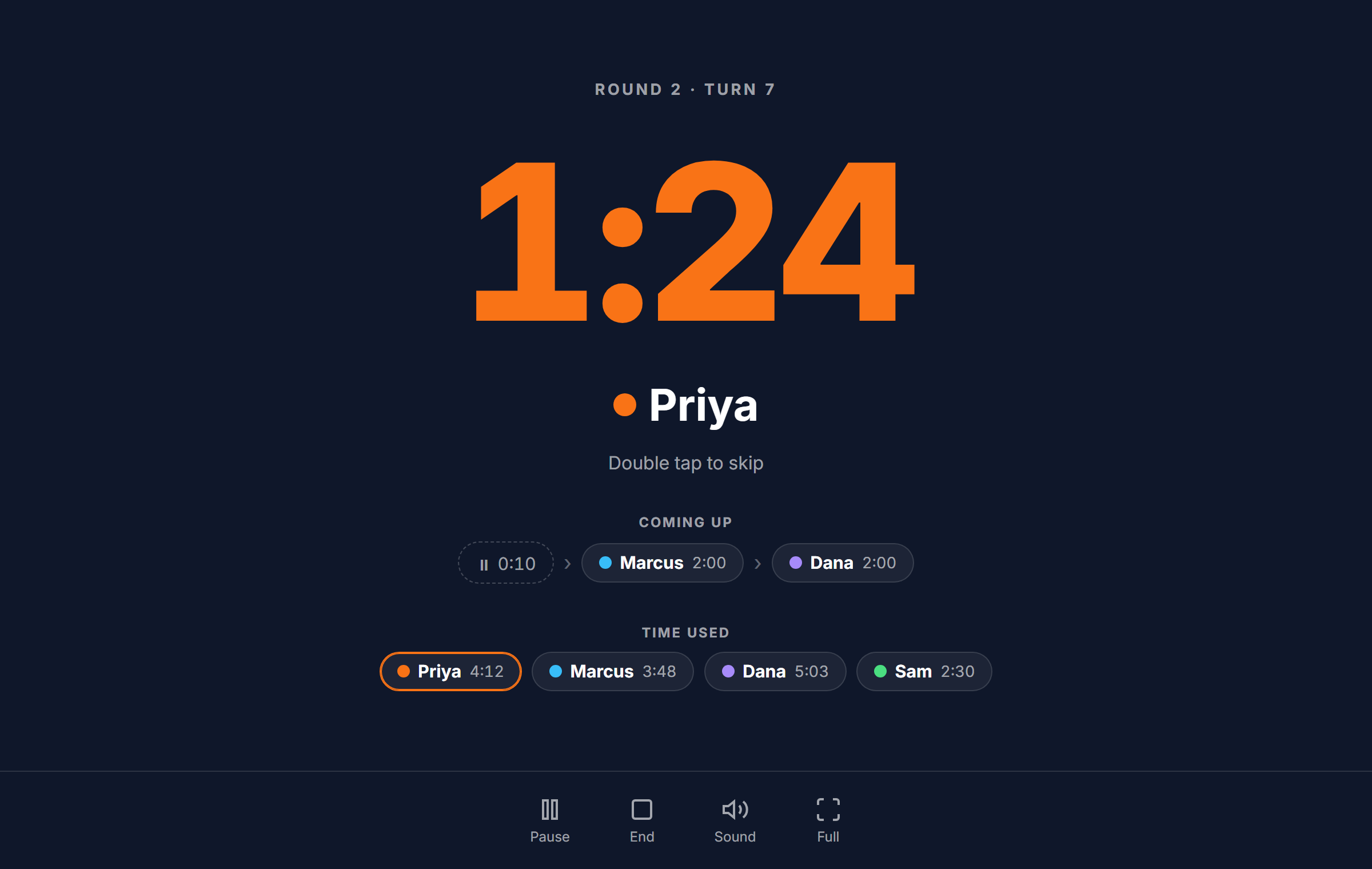
Timers also solve the total game length problem. If you set a 90-second turn timer for a five-player game and play ten rounds, the turn-based portion of the game caps at about 75 minutes. Add setup, scoring, and transitions, and you're still finishing in a reasonable window. That predictability matters when you're hosting on a weeknight and people have work in the morning, or when you're squeezing in a game before dinner.
- Prevents analysis paralysis and keeps turns from dragging on indefinitely
- Ensures every player gets equal time, so no one dominates the pace
- Creates natural urgency that makes decision-making more exciting
- Keeps total game length predictable for scheduling and hosting
- Works for board games, card games, party games, trivia, and more
The concept applies far beyond traditional board games. Card game tournaments, trading card game matches, trivia competitions, and even casual party games all benefit from having a visible clock. Any situation where people take turns making decisions can be improved with a timer. The difference between a game night that ends with "that was great, same time next week?" and one that ends with "I'm never playing that again" is often just pacing.
How to use EventTimer as a game timer
Setting up a game timer takes about five seconds. Open EventTimer on any device with a browser, set your countdown duration to whatever makes sense for the game (60 seconds, 90 seconds, 2 minutes, whatever you decide), and hit start when it's the first player's turn. When time runs out, the player finishes their action, you reset the timer, and the next player goes. That's it.
For tracking total game time instead of individual turns, switch to count-up mode. This works well for games where you don't want to limit turns but you want to know how long the whole session has been running. Start the count-up timer at the beginning of the game and let it run in the background. When someone asks "how long have we been playing?", just glance at the screen.
Fullscreen mode is especially useful for game nights. Tap the fullscreen button and the timer fills the entire screen with large, readable digits. Place the phone or tablet in the center of the table, prop a laptop up where everyone can see it, or cast it to a TV in the room. When the countdown is visible to the whole group, nobody needs to ask "how much time do I have?" and the timer enforces itself naturally. People respond to a visible clock the way they respond to a traffic light. They just comply.
Quick setup for game night
1. Open eventtimer.io on a phone, tablet, or laptop
2. Set your turn duration (e.g. 60 seconds for fast games, 90 seconds for strategy games)
3. Tap fullscreen so the whole table can see the countdown
4. Start the timer when a player's turn begins
5. Reset and restart for the next player's turn
You can also use the timer for round-based timing rather than individual turns. Set the countdown to cover the entire round length (say, five minutes for everyone to complete their turns) and let the group manage their own pace within that window. This works well for games where turns happen quickly but you want to keep the overall round from stretching out. The timer becomes a shared clock for the table, not a pressure device aimed at one person.
Sound alerts are helpful when the timer is sitting on a table and people are focused on the board rather than the screen. The audible chime at the end of the countdown catches everyone's attention without requiring someone to watch the clock constantly. For quieter settings where you don't want an alarm going off, the visual countdown and color change are enough to signal that time is up.
Board games and strategy games
Strategy games are where turn timers make the biggest difference. Games like Settlers of Catan, Risk, Ticket to Ride, Terraforming Mars, and Wingspan all involve decision-heavy turns where players evaluate multiple options, trade resources, or plan several moves ahead. Without a timer, a single turn in Terraforming Mars can take five minutes while everyone else sits and waits. With a 90-second turn limit, that same player still makes a solid decision, just faster.
The key is choosing the right duration for the game's complexity. Simpler gateway games like Catan or Ticket to Ride work well with 60-second turn timers. The decisions are meaningful but not deeply layered, so a minute is plenty of time to decide where to place a settlement or which route card to draw. Heavier strategy games like Brass Birmingham or Twilight Imperium need longer limits, 90 seconds to two minutes, because each turn involves more variables and consequences.
What changes when you add a visible timer to a strategy game is the player dynamic. People stop second-guessing every possibility and start trusting their instincts. The result is often better gameplay, not worse. Experienced board gamers on BoardGameGeek have debated this for years, and the consensus leans toward timed turns improving the overall experience, especially at higher player counts where downtime between turns compounds.
Monopoly is an interesting case. The game's reputation for taking forever has less to do with the rules and more to do with players hemming and hawing over trades and property decisions. A 60-second turn timer transforms Monopoly from a three-hour slog into a 90-minute game that actually ends while people are still having fun. If your family has a love-hate relationship with Monopoly, a timer might tip the balance back toward love.
For cooperative games like Pandemic or Spirit Island, the timer can be used differently. Instead of limiting individual turns, set a countdown for the total discussion phase before the group commits to a plan. This prevents the "quarterback problem" where one experienced player dictates every move while others passively follow. A three-minute discussion timer forces the group to reach consensus quickly and gives quieter players a chance to speak up before time runs out.
Chess clocks and two-player timing
Chess players have been using timed games for over a century. The concept is simple: each player has a fixed amount of time for the entire game, and their clock runs only during their turns. When you make your move, your clock stops and your opponent's starts. If your time runs out before the game ends, you lose. This mechanic turned chess from a game that could theoretically last forever into a competitive sport with defined time constraints.
Traditional chess time controls fall into three categories. Classical games give each player 60 to 120 minutes. Rapid games allow 10 to 30 minutes per side. Blitz games run at three to five minutes per player. There's also bullet chess, where each player gets just one or two minutes for the entire game, which turns the board into something closer to a reflex test than a thoughtful strategy game. Each format produces a completely different feel and requires a different skill set.
You don't need a physical chess clock to play timed games. Our free online chess clock gives each player their own time bank: tap your side after a move and your opponent's clock starts, with blitz, rapid, and classical presets built in. Set it to five minutes each for a fast blitz game, or a longer control for a slower match. The same two clock setup works for any two player game where each side has its own time, from Go to competitive card games.
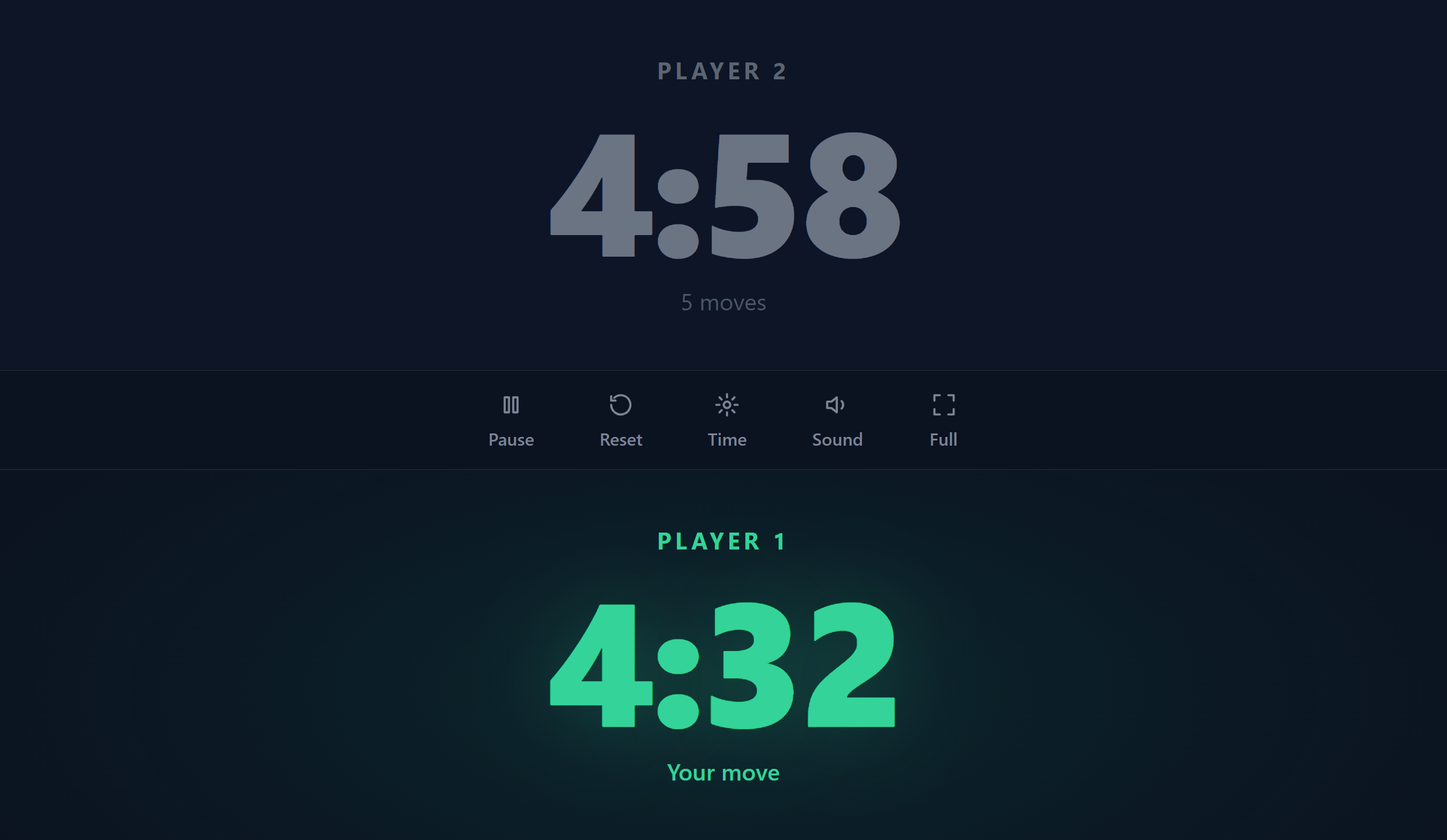
The same principle applies to any two-player game where you want timed turns. Backgammon, Go, Scrabble, and even competitive card games like Magic: The Gathering all benefit from visible countdowns. In tournament settings, Scrabble players typically get 25 minutes each, and the clock is part of the competitive infrastructure. For casual play, even a loose timer of 60 seconds per turn makes the game feel more dynamic and keeps both players engaged.
If you're teaching someone chess or any two-player strategy game, a generous timer can actually help the learning process. New players often freeze up because they're afraid of making a bad move. A five-minute countdown gently encourages them to commit to a decision and learn from the outcome rather than agonizing over perfection. Over time, they'll naturally get faster as they recognize patterns and build confidence.
Party games and trivia nights
Party games run on energy, and nothing kills energy faster than dead air. When someone is supposed to be acting out a clue in charades or drawing something in Pictionary and they take 90 seconds just to think about it, the room deflates. A 30-second or 60-second countdown timer keeps party games moving at the pace they're designed for, which is fast, loud, and a little chaotic.
For charades, Pictionary, Taboo, and similar performance-based party games, a 60-second countdown is the standard. The timer starts when the player picks their clue, and they have one minute to get their team to guess correctly. The time pressure is part of the fun. Nobody cares if the drawing is terrible because there are only 15 seconds left and the guessing becomes frantic. That urgency is what creates the memorable moments.
Trivia nights benefit from timers in a different way. Instead of putting pressure on a single performer, the timer gives the whole team a window to discuss and lock in their answer. A 30-second countdown per question prevents teams from overthinking and keeps the pace snappy. For longer trivia formats with multi-part questions, two minutes per question gives teams enough time to debate without letting the round drag on. The host sets the timer, everyone sees it counting down on the screen, and answers are due when the buzzer sounds.
Fullscreen mode is especially effective for party games and trivia because it turns the timer into a centerpiece. Put a tablet or laptop in the middle of the room with the countdown displayed large enough for everyone to read, and the timer becomes part of the entertainment. The group counts down together, cheers when someone beats the clock, and groans when time runs out one second too soon. Check out our gaming events guide for more ideas on running timed gaming gatherings.
- Charades and Pictionary: 60-second timer per round for fast-paced action
- Trivia: 30 seconds per standard question, 2 minutes for multi-part rounds
- Word games like Boggle or Scattergories: 3-minute timer for each round
- Rapid-fire rounds: 10-15 seconds per answer for sudden-death tiebreakers
- Karaoke or talent show acts: 3-5 minute countdown per performer
One practical tip: for party games, use the sound alert. In a noisy room, people won't always be watching the screen. The audible chime cuts through the chatter and laughter to signal that the round is over. Without the sound, you end up with someone awkwardly shouting "time's up!" and nobody hearing them on the first try.
Tabletop RPGs and campaign sessions
Dungeons and Dragons sessions, Pathfinder campaigns, and other tabletop RPGs have a very specific timing problem. Combat encounters that should take 30 minutes stretch to 90 because every player spends their turn agonizing over spell choices, calculating movement distances, and having side conversations while the DM waits. Meanwhile, the narrative portion of the session gets squeezed because combat ate up all the time.
A combat round timer fixes this beautifully. Set a 60 to 90-second countdown for each player's turn in combat. When the timer starts, the player declares their action, rolls their dice, and resolves the outcome. If they haven't acted when time runs out, their character takes the Dodge action (or whatever default the group agrees on) and the turn passes. This might sound harsh, but most tables that try it find that combat becomes dramatically more exciting. Players start planning their turns while others are going, which is exactly what their characters would be doing in a real fight.
Session timers serve a different purpose. A four-hour campaign session sounds generous until you realize the first hour went to recapping last week's events, the second hour was a single combat encounter, and now you have two hours for the actual plot content you prepared. Setting a total session timer with visible milestones helps the DM pace the evening. Glance at the countdown, see that two hours remain, and decide whether to push forward with the narrative or wrap up the current scene and save the rest for next week.
Break reminders are another smart use of a timer during long RPG sessions. Set a two-hour countdown at the start of the session, and when it goes off, everyone takes a 15-minute break to stretch, refill snacks, and reset. Players come back more focused, and the second half of the session is usually sharper than it would have been without the pause. Our online countdown timer guide covers more ways to use countdowns for long-format events like these.
For virtual tabletop sessions on platforms like Roll20 or Foundry VTT, a browser-based timer running in a separate tab can be shared through screen sharing so all players see the countdown. This works well for online D&D groups where the DM wants to keep combat moving but doesn't want to install yet another plugin. Just open the timer, share the tab, and let it run alongside the virtual tabletop.
Esports and competitive gaming events
Competitive gaming events, from local LAN parties to organized esports tournaments, rely heavily on precise timing. Match countdowns, round timers, break intervals, and schedule adherence are critical to keeping a tournament running smoothly. When you have 32 teams in a bracket and each round needs to start on time, a visible countdown timer displayed on venue screens or stream overlays keeps the entire operation on track.
Tournament organizers use timers in several ways. Between matches, a countdown displayed on the main screen tells players when the next round starts. This reduces the chaos of herding competitors back to their stations after breaks. During drafting phases in games like League of Legends or Dota 2, a pick and ban timer keeps the pre-game phase moving so the audience doesn't lose interest. And for round-robin formats where multiple matches happen simultaneously, synced countdowns ensure all matches start and end at the same time.
Stream overlays benefit from visible timers too. When a tournament stream shows a "next match starts in 5:00" countdown, viewers know exactly when to pay attention again. This is better than a static "be right back" screen that gives no indication of when the action resumes. The countdown keeps the audience engaged during downtime, which is valuable for maintaining viewership and keeping sponsors happy.
For smaller events like local fighting game tournaments, retro gaming competitions, or LAN parties, the setup can be much simpler. Open a timer in a browser on the TO's laptop, put it in fullscreen on a monitor that faces the room, and use it to signal round transitions. No production software needed. The same tool that times a board game turn at your kitchen table can time the grand finals of a local Smash Bros bracket. If you're planning a gaming tournament, our hackathon schedule template covers similar event structuring principles, and the conference timer guide has tips for managing multi-session events with tight schedules.
Even casual competitive events like Mario Kart nights or Smash Bros round-robins benefit from a timer. Set a countdown between matches so players have a defined window to get up, switch controllers, and settle in. Without that structure, a "quick break" between rounds turns into 20 minutes of chatting and snack runs, and suddenly your eight-player round-robin takes all night.
Choosing the right timer settings for your game
The effectiveness of a game timer depends entirely on choosing the right duration and mode for what you're playing. Too short and players feel rushed to the point of frustration. Too long and the timer doesn't actually solve the pacing problem. The goal is a sweet spot where players have enough time to make meaningful decisions but not so much that they drift into analysis paralysis.
Recommended turn times by game type
- Light party games (Codenames, Dixit): 30-60 seconds per turn
- Gateway board games (Catan, Ticket to Ride, Azul): 60 seconds per turn
- Mid-weight strategy games (Wingspan, Everdell, Splendor): 60-90 seconds per turn
- Heavy strategy games (Terraforming Mars, Brass, Scythe): 90-120 seconds per turn
- Chess (blitz): 3-5 minutes total per player
- Trivia questions: 30 seconds for standard, 2 minutes for multi-part
- RPG combat turns: 60-90 seconds per player
- Performance party games (charades, Pictionary): 60 seconds per round
Sound alerts versus visual-only timers
Sound alerts work best in loud, social settings where players are focused on the game board or each other rather than watching a screen. Party games, trivia nights, and large group settings all benefit from an audible chime or buzzer that signals the end of a turn. For quieter settings like a late-night strategy game or a focused chess match, visual-only mode is less intrusive. The countdown display and color transition from green to yellow to red provide a gradual warning that doesn't break concentration.
Countdown versus count-up
Countdown timers create urgency. They tell players "you have this much time left," which naturally speeds up decision-making. This is what you want for turn limits, timed rounds, and any situation where you're trying to keep things moving. Count-up timers track elapsed time. They're useful for monitoring total game length, logging session duration for RPG campaigns, or tracking how long a tournament match has been running without imposing a hard limit. If you're debating which mode to use, start with a countdown. It's more effective at solving the pacing problems that make people reach for a timer in the first place.
Pro tip for first-time timer users
If your group has never used a turn timer before, start generous. Add 30 seconds to whatever you think is the right limit. After a few rounds, everyone will naturally speed up as they get used to the rhythm, and you can tighten the limit next session if needed. The goal is to improve pacing, not create stress. A timer that feels too tight will get abandoned. A timer that feels comfortable will become a permanent part of game night.
Placement matters too. The timer should be visible to everyone at the table without anyone having to crane their neck or lean over to check it. A phone propped up in the center of the table works for small groups. A tablet or laptop with the timer in fullscreen mode works better for larger groups or when the game board takes up most of the table space. For the best visibility, cast the timer to a nearby TV so the digits are large enough to read from any seat in the room.
If you're hosting regularly, experiment with different timer lengths over a few sessions and ask for feedback. Some groups prefer a strict timer with consequences (skip your turn if time runs out), while others use the timer as a soft guideline that creates awareness without enforcement. There's no single right answer because it depends on the group's personality and the games you play. The important thing is that the timer creates better pacing and more engagement, which it almost always does regardless of the exact settings.
A game timer isn't about rushing people. It's about creating a rhythm that keeps everyone at the table involved, focused, and having fun. Whether you're playing a two-hour strategy game, running a trivia night for 30 people, managing combat in a D&D campaign, or organizing a weekend esports tournament, a visible countdown changes the dynamic for the better. The slow turns speed up, the total game time becomes predictable, and the overall energy stays high from the first move to the last. Try it once and you'll wonder how you ever played without it.
Quick-start timers and tools
- Board Game Turn Timer: loops around the table with a time per player
- Chess Clock: two clocks with blitz, rapid, and classical presets
- Fullscreen Timer: large display visible to everyone at the table
- Game Timer hub: turn timers, chess clocks, and round countdowns
Set up your game timer
Pick a duration, go fullscreen, and keep your next game night moving. Free, no account required, works on any device with a browser.
Start game timer